 StewardBook
Know where every rupee of the church went.
StewardBook is the accounts app built for church treasurers. Subscription cards, Sunday offerings, vouchers, the cash box, bank and fund balances and auctions, for the main church and every branch. When the committee, the diocese or the auditor asks, the answer is one report away.
ஆலயக் கணக்குகளுக்கான எளிய செயலி: சந்தா அட்டை, காணிக்கை, செலவுச் சீட்டு, வங்கி மற்றும் நிதி இருப்பு — அனைத்தும் ஒரே இடத்தில்.
Free for 30 days, no card needed. Pricing is shared before your trial ends. Works on any phone or computer browser.
GC-118
| Category | Apr | May | Jun | Total |
|---|---|---|---|---|
| Monthly Subscription | 300 | 300 | 300 | 1,500 |
| Thanks Offering | 500 | 750 | ||
| Mens Fellowship | 100 | 100 | 300 | |
| Auction Due | 400 | 400 | ||
| Paid this year | ₹2,950 |
Church money is God's money. It deserves to be kept with care.
Many churches still keep their accounts in notebooks, scattered Excel sheets and memory. Offerings are counted in a hurry, receipts go missing, and at audit time the Treasurer spends days finding out where the money went.
StewardBook was built to end that worry: to make church finance simple, easy and convenient, and to give every church a complete income and expense record that supports a complete audit.
Trustworthy
No overdrafts, no double posting, and a full trail of every change, so the books can be relied on.
Provable
Cash book, bank reconciliation and signed reports, so the Treasurer can show the numbers are right.
Useful
Budgets, pledges, bills and cheques in one place, with Quick entry for everyday work.
Why the name StewardBook?
Steward
From the Bible's idea of stewardship. A steward is someone trusted to look after what belongs to another, and must be found faithful (1 Corinthians 4:2). Offerings, subscriptions and pledges are given to God, and the people who handle them are stewards.
Book
The book of accounts, where every rupee received and spent is written down clearly, so that anyone can check it.
StewardBook
The faithful keeping of God's money, written in a book that can be trusted.
See it in the app
Real screens from a demo church, on an ordinary phone. Money in is green, money out is red, and every figure is in Indian rupee format.
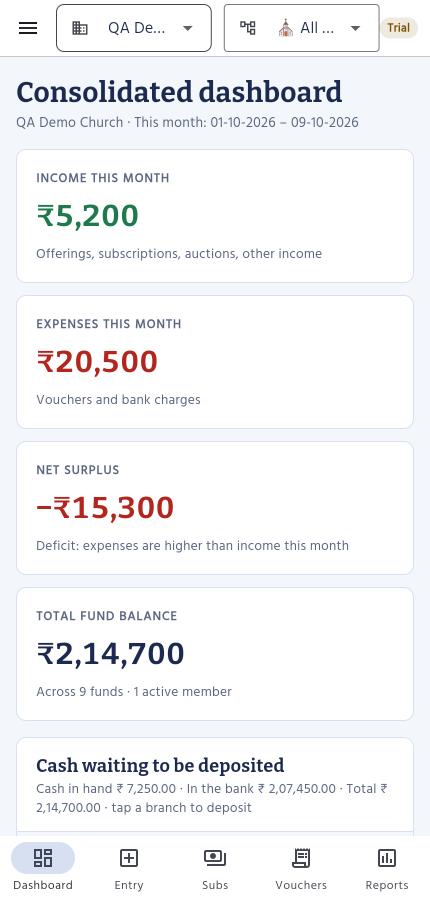
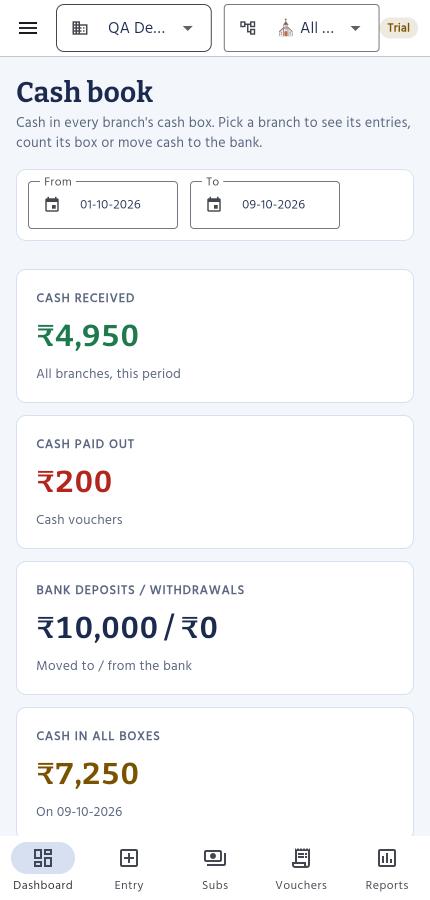
Everything the church office keeps in its registers, in one place
No more subscription books in one cupboard, Excel sheets on one laptop and a cash tin nobody has counted. StewardBook follows how Indian churches really keep accounts, then adds the checks an auditor would ask for.
Offerings counted and signed
Count the notes at each service, and the total works itself out. Two counters sign the sheet.
A cash box for every branch
See what came in, what went out and what was banked, and be told at once if the box is short or extra.
Vouchers with a trail
Numbered automatically, bills attached, cancelled with a reason and never deleted.
Cheques, bills and budgets
Mark cheques cleared or bounced, pay bills when due and watch each budget as you spend.
Every branch in one view
The main church sees all branches together. Each person sees only what you allow.
Ready for the auditor
Every change logged, finished periods locked, and the reports an auditor asks for in one download.
See every feature, in detail
Collect
Every rupee that comes in, entered once and posted to the right fund.
- Subscription cardsOne receipt for many categories: monthly subscription, thanks offering, fellowships, Sunday school and more. Each member's card shows the whole year at a glance.
- Sunday offerings, counted properlyRecord each service by category. Count the notes as you go and the total is worked out for you, so two counters can sign the sheet with confidence.
- Member pledgesNote what each member has promised for the year. See what is paid, what is still to come and who to remind, all from their real receipts.
- AuctionsRecord items sold to members or visitors. Track what is paid and what is due, and let members clear it with their next subscription.
- Quick entrySubscriptions, offerings, expenses, bills, pledges, auctions and bank entries from one screen, with today's totals alongside. Built for the busy hour after service.
Spend
Every payment has a voucher, and every voucher has a trail.
- Expense vouchersPaid to, being, amount, mode and ledger head, numbered automatically (V-2026-0001, V-2026-0002 and so on) with no gaps for the auditor to question.
- Bills to payNote a bill the day it arrives, see what is due and what is overdue, and pay it later with one tap. Nothing is booked until it is paid.
- Cheques that clear, or don'tMark each cheque cleared or bounced. A bounce reverses the payment and reopens the bill, with the reason on record.
- One cash payment, several fundsPaid ₹100 in cash for a job shared by two funds? Split it, and each fund is charged its share.
- Bills attachedAttach the bill as a PDF or photo, up to 10 MB, to the voucher it belongs to.
- Budget against actualSet a yearly budget for each expense head and watch what is spent, what is left and the percentage used.
- Cancelled, never deletedA wrong voucher is cancelled with a reason. The record stays for the auditor and the fund is corrected.
Cash and bank
Know what is in the box, what is in the bank, and that they agree.
- A cash book for every branchCash received, cash paid out, cash banked and what should be in the box today. Count the box, and StewardBook tells you at once if it is short or extra.
- Counting rules you decideThe church admin chooses, for each kind of entry, whether counting notes is off, optional or required.
- Separate funds and bank accountsGeneral, building, mission, rural church, cemetery, school and more. Add your own funds and categories whenever you need them.
- Deposits, withdrawals and transfersBank interest, charges, cash deposits and transfers between funds, each with its reference. Check the books against the bank statement.
- No fund goes below zeroA payment that would overdraw a fund, even on an earlier date, is stopped before it is saved.
Run many branches
The main church sees everything; each branch keeps its own books.
- Consolidated viewSwitch between one branch and all branches together for the dashboard, cash, funds and every report.
- The right access for each personView only, add entries, add and edit, or full access including delete, for the whole church or chosen branches. Only the church admin gives access.
- Approval for big paymentsVouchers above the limit you set wait for the church admin to approve.
- Members your wayImport members from Excel, with a check that stops the same family being added twice. Add your own fields, such as date of birth or occupation.
- Tamil and English namesNames, families and notes can be entered in Tamil, English or both.
Be audit-ready
The proof is built in, not added at year end.
- Audit logEvery entry, edit, cancellation and settings change is recorded with who made it and when.
- A register of deleted recordsIf a receipt is removed, a full copy is kept, with the reason, for the auditor to see.
- Close the booksLock a period once it is audited. Nothing dated on or before that day can be added, changed or deleted.
- Audit pack in one downloadThe reports an auditor asks for, together in one file, with signature lines for the treasurer and the pastor.
Stay safe
Mistakes are caught before they reach the books.
- No double entriesPressing Save twice, or a slow connection, never posts the same receipt twice.
- No silent overwritesIf two people edit the same member, the second is asked to reload rather than overwrite.
- Backups, and your data is yoursDaily backups kept 30 days, restore to any moment in the last 7 days, and a full download of every record as an Excel-ready file whenever you want it.
- Signed out when you walk awayAn unattended screen signs itself out after 30 minutes, and closing the browser ends the login.
Reports your committee, diocese and auditor will actually accept
Choose a branch or all branches, pick a period (this month, last month, this financial year or any dates) and print. Every report carries your church's name, address, logo and signature lines, ready to sign.
- Consolidated financial summaryAll branches: income, expenses, fund position
- Income and expenditureReceipts and payments by category, surplus or deficit
- Offering and subscription collectionsBy service, member, category or dates
- Fund and bank ledgerOpening balance, deposits, withdrawals, closing balance
- Expense vouchers and audit logVoucher register, ledger totals, who changed what
- Auction registerSold, received and still due, by auction and by buyer
- Cash book and depositsCash in each box and every bank deposit
- Cash counting sheetNotes counted at each service, with signature lines
- Budget against actualSpent, left and percentage used for each expense head
- Pledges and bills payableWhat members have promised, and what the church still owes
Getting started
Register
Create your login with your email address and start the 30-day free trial.
We set up your church
Your church, branches, funds and categories are ready, with the standard church categories already filled in.
Bring your members and start entering
Import your member list from Excel, enter opening balances and the cash in the box, and record this Sunday's offering. A setup guide walks you through each step.
Simple prices, by the size of your church
Every plan has every feature. Plans differ only by the number of members, branches and logins. Pay monthly, or yearly for less.
Diocese
For a diocese or group running many churches: unlimited members, branches and logins for every church, one invoice for all of them, onboarding and training, and help moving old records in. Priced per church, with volume discounts.
Included in every plan
- Subscription cards and receipts
- Offerings by service
- Expense vouchers with bills attached
- Funds, bank accounts and transfers
- Auctions and balances due
- Quick entry screen
- Every report, print, PDF and Excel
- Member import from Excel
- Your own member fields
- View, add, edit and delete access for each person
- Audit log of every change
- Daily backups, data kept in India
Prices are in Indian rupees and do not include GST. Inactive members don't count towards your limit. Logins are the people who can sign in, including invitations not yet accepted.
Questions churches ask
Will it satisfy our auditor?
That is what it is built for. Every entry has a receipt or voucher number, nothing is silently changed or deleted, every change is logged with who and when, and you can lock a finished period. One download gives the auditor the reports they ask for.
Can it keep track of the cash in the church office?
Yes. Each branch has its own cash book: cash received, cash paid out, cash banked and what should be in the box. Count the notes and it tells you if the box is short or extra.
Can we take our data out if we ever leave?
Yes. The church admin can download every record from every branch as one Excel-ready file at any time. Your books are yours.
Is our church's data safe?
Your data is stored in Google Cloud in Mumbai. Each church can see only its own records, and each person sees only what their role allows. The database is backed up every day, and backups are kept for 30 days.
We keep everything in registers and Excel today. Can we move?
Yes. Import your member list from Excel, enter each fund's bank balance as the opening balance, and start entering from today. Nothing from your old records has to be typed in again.
What happens when we grow past our plan?
Nothing you've entered is ever removed or hidden. You simply can't add more members, branches or logins until you move up a plan, and the upgrade takes effect straight away.
Do members who've left count towards the limit?
No. Mark a member inactive and they stop counting, while their payment history stays on record.
What happens after the 30-day trial?
Everything you entered during the trial stays as it is. We'll help you choose the plan that suits your church.
Can we control who can change what?
Yes. The church admin decides for each person whether they can only view, add entries, also edit them, or also delete and cancel, and whether that covers the whole church or only chosen branches. Every change is recorded with who made it.
Can our branch churches use it separately?
Yes. Each branch keeps its own members, offerings, vouchers and fund balances, with its own people entering data. The main church sees every branch, one at a time or all together.